WooCommerce RFQ plugin
Let buyers request a quote instead of adding to cart, then turn the request into a real WooCommerce order in one click.
Free, unlimited quotes. No account needed.
The RFQ flow, end to end
Four steps. Every screen below is the actual plugin, not a mockup.
-
1
The buyer asks for a price
A Request a Quote button sits next to Add to Cart on product pages, and on the cart page. Turn either off, or drop the button anywhere with a shortcode.
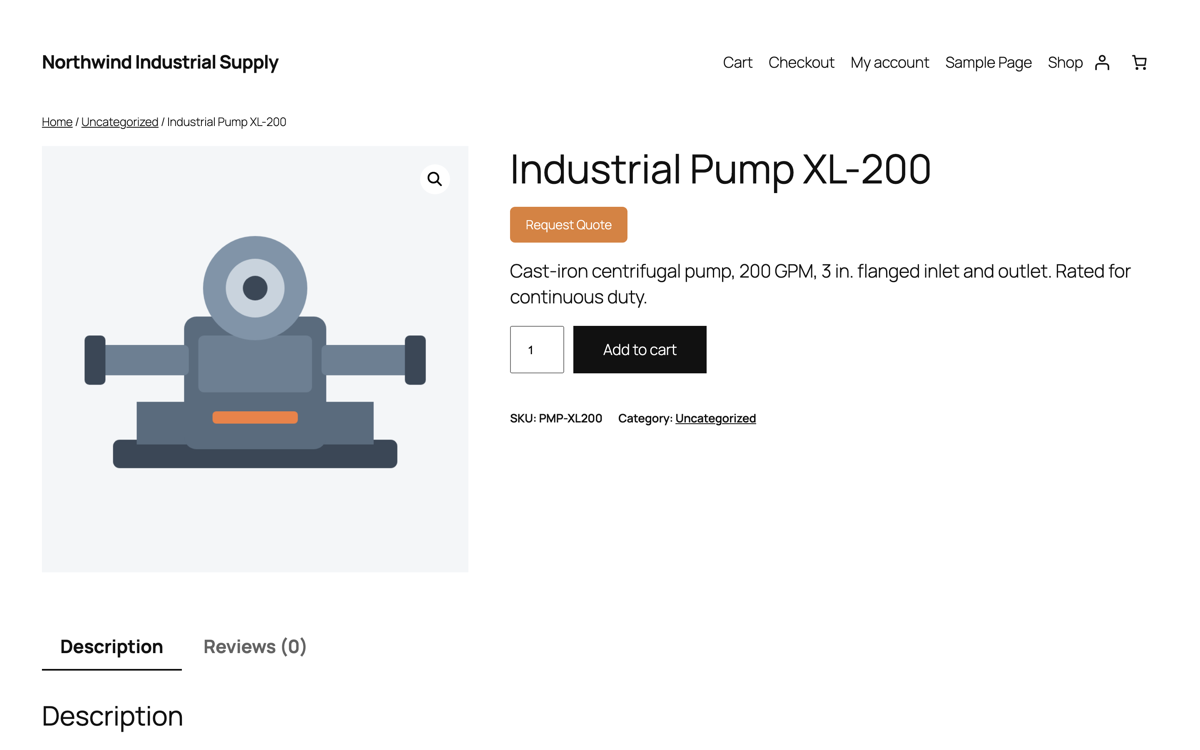
Product page, button in place -
2
They fill one short form
Name, email, company, phone and a message. It opens over the page they were already on, so nobody gets redirected away mid-thought.
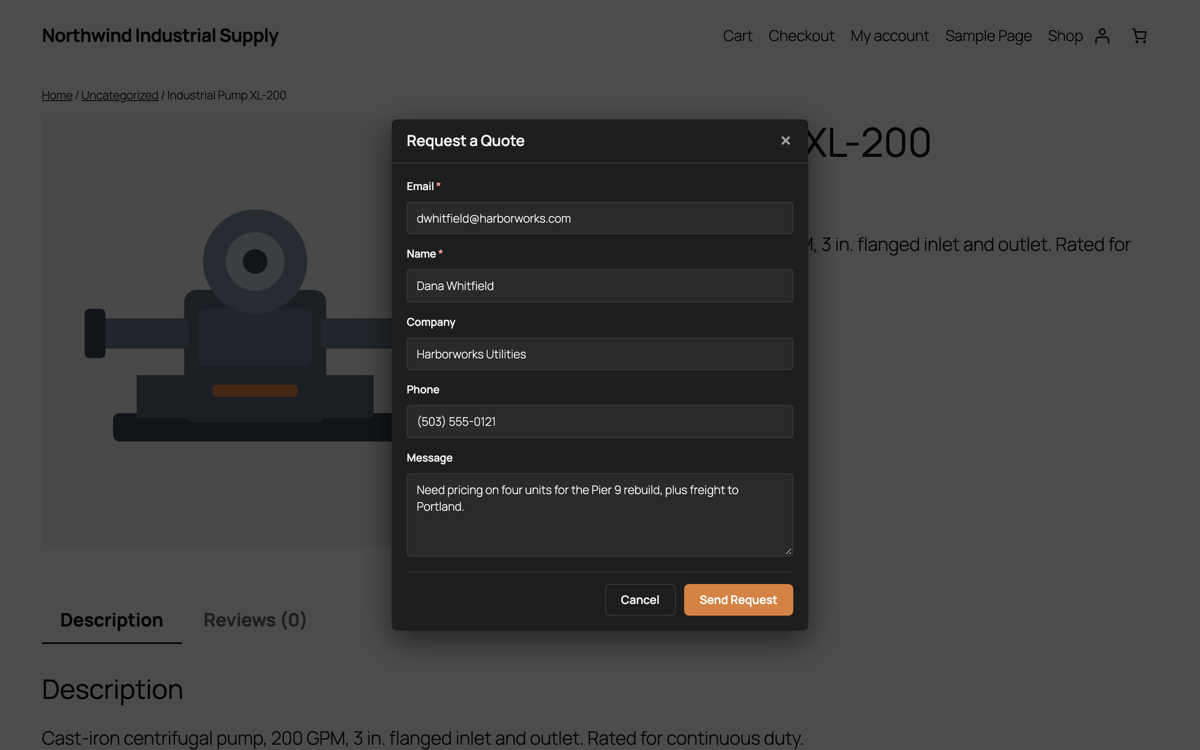
The request form -
3
Every request lands in WP Admin
WooCommerce → Quotilio Quotes. Who asked, which company, what they wanted, what it totals. You get an email for each one; the buyer gets a confirmation.
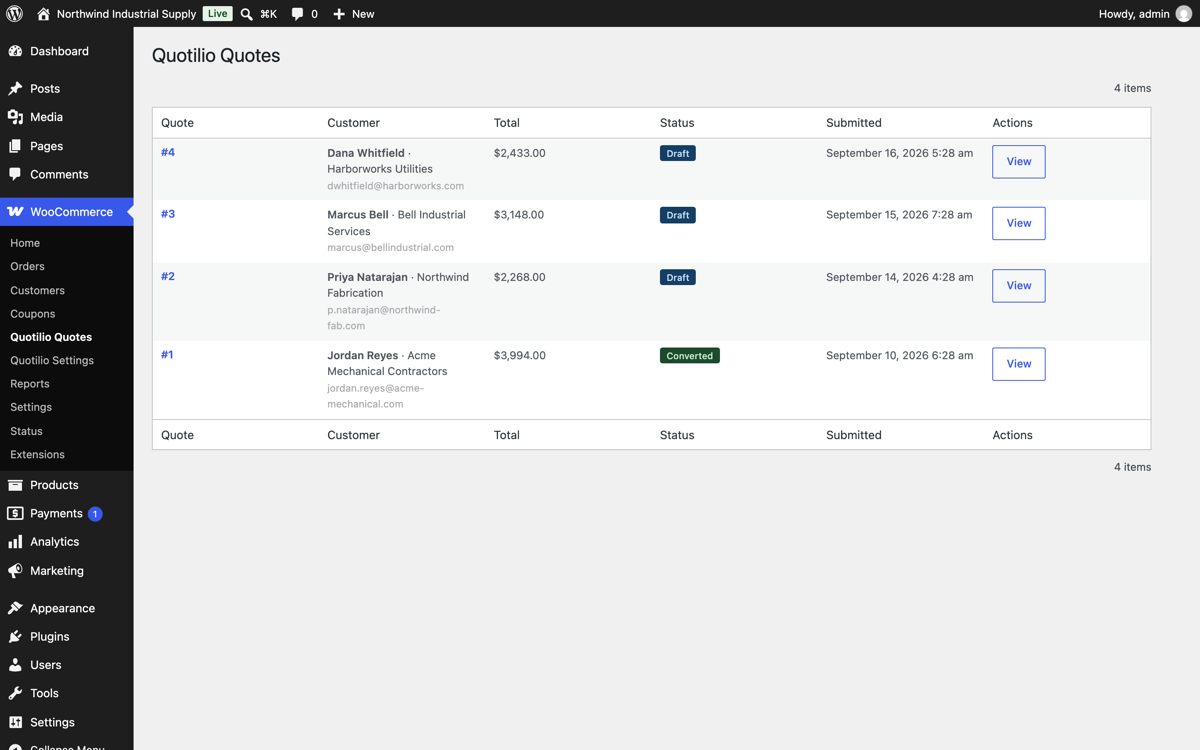
All quotes in one list -
4
One click makes it an order
Convert to Order builds a real WooCommerce order using your existing shipping, tax and payment setup. No re-keying, no copy and paste, no parallel system to maintain.
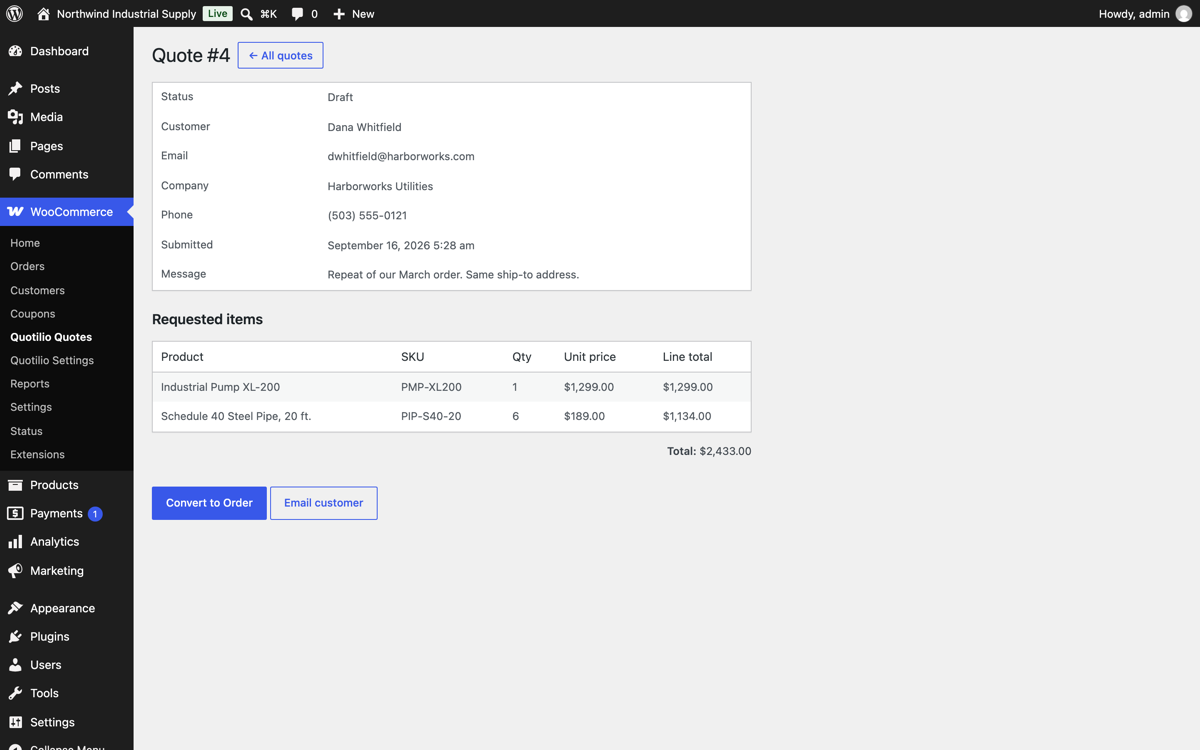
Quote detail, ready to convert
When a store needs RFQ instead of a cart
RFQ is short for request for quote: the buyer asks what it would cost, you answer, and only then does money move.
Price depends on quantity
Ten units and a thousand units are not the same price, and you are not publishing the break table to competitors.
Freight decides the number
Heavy, oversized or palletised goods where shipping has to be worked out before anyone can commit.
Accounts are negotiated
Trade customers on agreed terms. A public price on the page is the wrong answer for them.
The spec isn't fixed yet
Made to order, cut to length, configured per job. The conversation is the sale.
What you get free
All of this is in the free plugin on WordPress.org. No quote cap, no trial timer.
Free Quote button, two places
Product pages and the cart page, each switchable, plus a [quotilio_request_quote] shortcode for anywhere else.
Free Quotes inside WordPress
A native admin list and detail view. Your quote data stays in your own database.
Free Convert to a real order
Uses your shipping and tax rules. Works with High-Performance Order Storage.
Free Catalog mode
Hide prices and Add to Cart across the store, leaving Request a Quote as the only way to buy.
Free Emails both ways
You get every new request at the address you choose; the buyer gets a confirmation.
Free Works with your theme
Cart block and classic cart, and themes built on Elementor, Divi or Bricks.
RFQ or wholesale pricing? They solve different problems
Worth being honest about, because picking the wrong one wastes a fortnight.
Use a wholesale plugin when
Your trade prices are fixed and known. A logged-in wholesaler should simply see a lower number and check out normally. That is a pricing rule, not a conversation.
Use RFQ when
The price cannot be written down in advance. Volume, freight, spec or account terms decide it, and somebody has to quote the job.
Plenty of stores run both. Quotilio handles the second half.
If you quote all day, Pro pays for itself
The free plugin never expires and has no caps. Pro is $15/month and adds the parts that matter once quoting is routine.
Pro Edit before you convert
Change quantities and unit prices, add a discount or an adjustment, then turn it into the order.
Pro PDF quotes
Attach a PDF to the customer email, and resend it from the quote screen when they ask again.
Pro Catalog mode, targeted
Hide prices for one category, one product or one customer role instead of the whole store.
Pro Your words, your emails
Edit the customer email subject and body, and search quotes by customer, company or product.
Questions worth asking first
Does it replace my checkout?
No. It sits alongside it. Leave Add to Cart where it is and add a quote button, or switch on catalog mode and make quoting the only path. Your call, per store.
What happens to an accepted quote?
It becomes an ordinary WooCommerce order with the buyer's details, line items and an order note. From there it behaves like every other order you have.
Does my quote data leave my site?
No. Quotes live in your own database. The plugin makes no outbound calls unless you switch on the optional usage report, which sends version numbers and counts only.
Will it work with my theme and my cart?
It handles the WooCommerce cart block and the classic cart, and page builders including Elementor, Divi and Bricks. It needs WordPress 6.4, WooCommerce 8 and PHP 8.2 or newer.
Is there a catch with the free version?
No quote limit and no trial clock. Pro exists for stores that quote often enough to want editing, PDFs and targeted catalog mode.
Add a quote button in about five minutes
Install from WordPress.org, pick where the button shows, and take your first request today.
Or in WP Admin: Plugins → Add New → search “Quotilio”.